
Virtual assistant
What the virtual assistant does for your business, step by step
The WhatsApp virtual assistant takes bookings and reservations, answers customer questions straight from your catalog, sends reminders automatically, and answers phone calls too, with a real voice. It comes together with a control panel, where you see everything it does in one screen.
The first message
Nobody has to write first
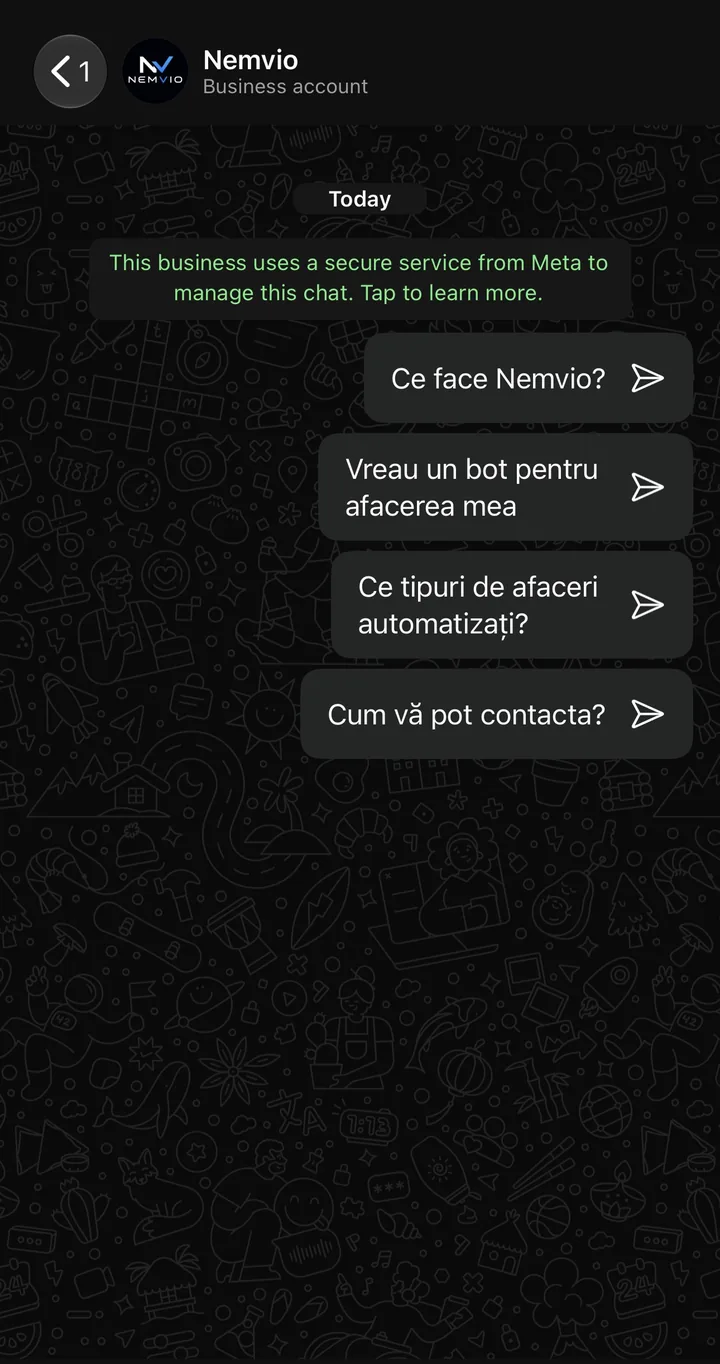
From the first second someone opens the conversation, they don't land on a blank screen. WhatsApp allows four questions prepared in advance, and those are yours: you write them, for your business. A tap sends one like any other message, so the answer comes from the bot, out of your catalog and your hours, not from a fixed text written once and forgotten. The customer can always type freely instead of tapping, and the conversation has started without them having to work out where to begin.
- Four questions, the most WhatsApp allows, written by you
- They only appear before the first message and disappear as soon as the customer has written something
- A tap sends them as an ordinary message, so they get a real answer, not a pre-written one
- You change them in the WhatsApp number's own settings, without touching anything the bot knows
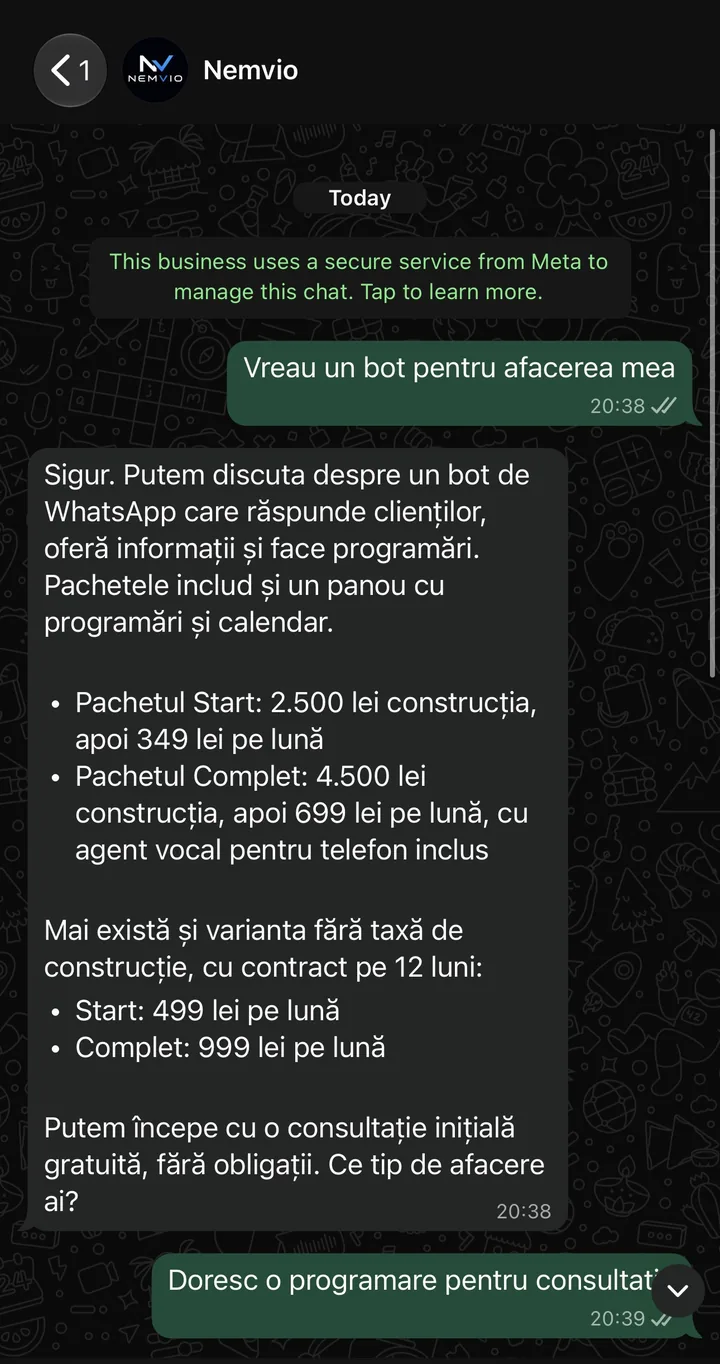
- "I want a bot for my business" is one of them, and it leads straight into the conversation below
Questions
Answers with the real prices, on the spot
The bot doesn't dodge the money question. The prices are not written into what the bot says; they live in a separate field in your settings that it reads on every answer. Services and durations come from the catalog in the panel, hours and address from the business settings. So it has nowhere to invent a figure from, and no way to fall behind: change a price in the panel and the next person who asks gets the new one.
- Prices live in one place, not repeated across several answers that then contradict each other
- Services, durations, and who can do what come from your own catalog in the panel
- Answers just as fully about hours, address, or contact details
- If the question falls outside what it knows, it opens a request in the panel and messages you on WhatsApp
- Nobody waits until morning for a number
Right now
You can try it yourself, for real
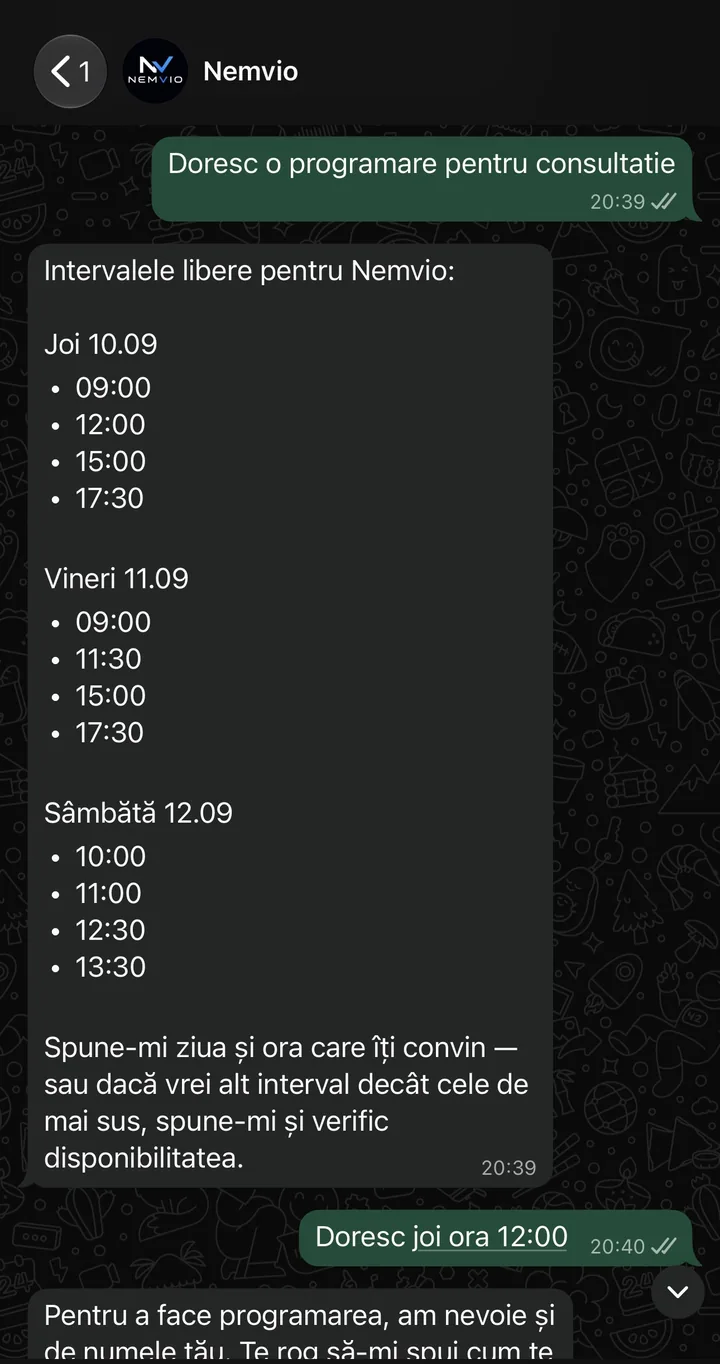
This isn't a mockup, it's exactly what you get if you write to Nemvio on WhatsApp right now. You ask for an appointment and the bot doesn't read from a hand-written list: it builds the slots on the spot, checking the business hours for that day, each employee's own hours, the break, their time off, the days the business is closed, and the bookings already made. What survives all of that is what it shows you. You pick one by writing normally, "Thursday at 12:00", not by tapping a calendar.
- The initial consultation is free (0 lei)
- Accounts for the break, each employee's time off, and the days the business is closed
- If only one person does a service, it shows you only their hours, not everyone's
- Want a time other than those shown? Ask and the bot checks
- You can write any time, even at night: the bot replies instantly
- Prefer to talk directly? Call 0727 280 025
Confirmation
Asks your name, reads it back, then books
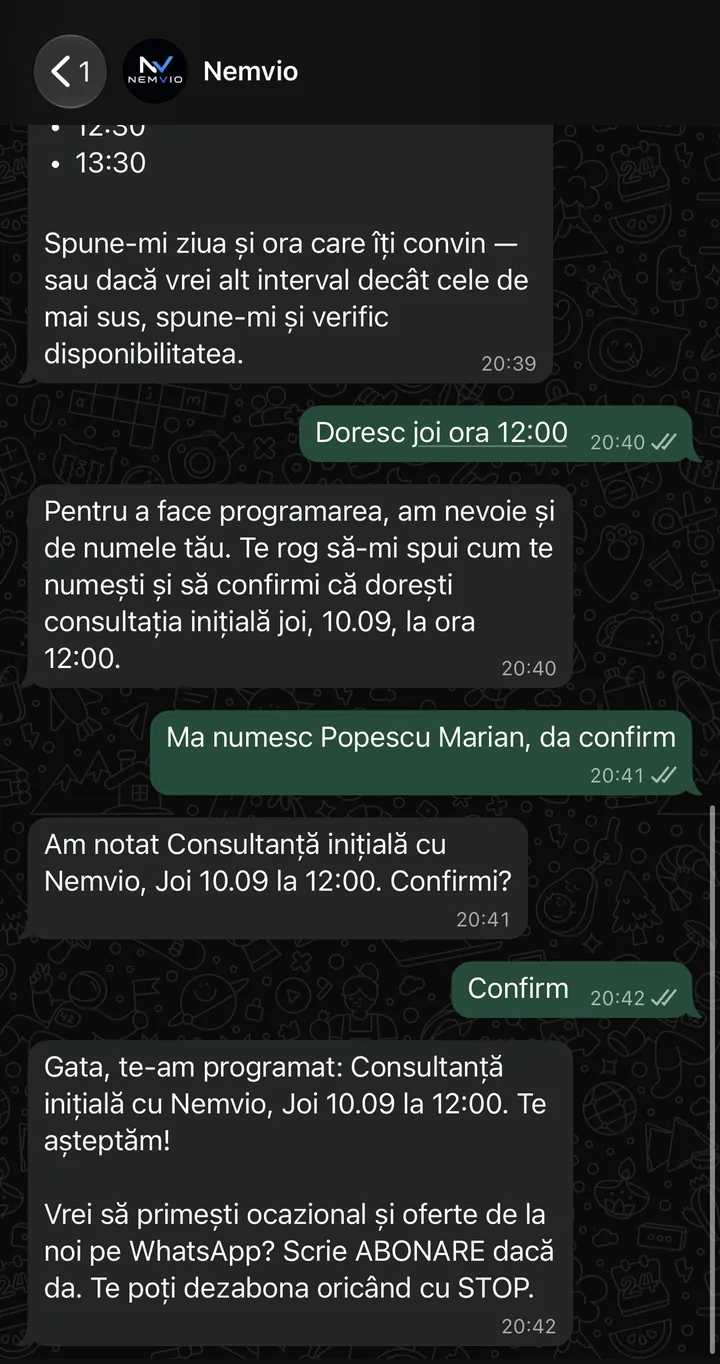
Before writing anything into the diary, the bot repeats back what it understood and asks for an explicit yes. That rule is not a plea inside the bot's text, it is in the code: without the customer's own words nothing is written, and the bot cannot say "you're booked" if the booking did not actually happen. At the end it asks separately whether you want offers too, because a booking is not marketing consent.
- Nothing enters the diary without the customer's own words, not merely without the bot assuming
- The assistant cannot announce a booking that did not happen: the code stops it
- The booking stays written in the conversation, as proof
- The bot moves an appointment at most twice, then calls you in
- A STOP stops the offers, not the confirmations and reminders for their own bookings
What else it does
Another 14 things, in the same conversation.
Above is the conversation from the first message to the booking made. These are the rest: it moves and cancels, knows what you already have, goes quiet when it calls a person in, and cannot announce something that did not happen.
Reminder
Reminds them on its own, on time
- Sent automatically, no action needed from you
- The customer can reply directly, and the bot reschedules if needed
- Reaches the customer even if a long time has passed since the last message
Calls
Answers by phone too, not just in writing
- Call straight through WhatsApp, no separate phone number
- Same availability rules as in writing, no overlaps
- Confirms the booking out loud, on the spot, during the call itself
Reschedule
Moves the booking, still from the conversation
- The two-move limit is in the code, not a plea in the bot’s text
- The new time goes through the same checks as the first
- It cannot announce a move that did not happen
Cancellation
Cancels without anyone phoning
- The slot frees up immediately for the next customer
- It cannot announce a cancellation that did not happen
- You see in the panel who cancelled and when
Memory
Knows what you already have booked
- It recognises the customer by number, not by what they wrote in this message
- It does not offer a time when you already have one that day
Handover
Knows when to go quiet too
- It stops the moment it asks for help, so the two of you never talk over each other
- The request is written to the panel even if the message to you fails to send
- The reason is written out, not just that they want to talk to someone
Truthfulness
It does not confirm what it did not do
- Each check was added after a sentence that actually reached a customer
- It works the same in writing and on the phone
- The check reads the text, so it catches new phrasings too
Tone
It does not write like a system
- It never mentions the name of a tool or an internal step
- It writes in Romanian, with diacritics, like the people on your team
Specialists
It knows who can do which service
- A service with no restriction can be done by anyone on the team
- The customer can ask for a specific person, and the bot checks whether they actually can
Everyday words
It understands “tomorrow”, not just 10.09
- It uses the business’s time zone, not the customer’s phone
- If something stays unclear, it asks instead of guessing
Reviews
Asks the customer for a review, after the visit
- It goes out on its own, after an interval you choose
- It stops for anyone who asked not to receive messages
Win-back
Writes to the customers who stopped coming
- You choose after how many months, and what it says
- It follows the same consent rules as a campaign
Phone and text
Sends in writing what was said on the phone
- The same conversation, not a message from another number
- A booking made on the phone shows up in the chat and in the panel
Blocks
It does not answer whoever you would not answer
- You block straight from the conversation, without hunting for the setting
- It can be undone any time, it is not permanent